Description
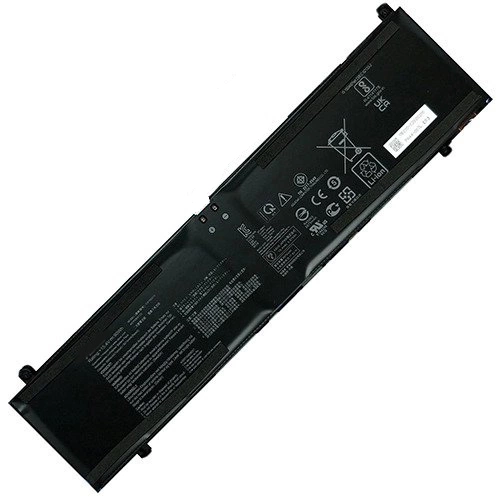
| Asus StudioBook HM5600QM battery specifications |
| Availability: | In Stock |
| Battery Type: |
Li-ion |
| Capacity: |
90Wh |
| Voltage: |
15.4V |
| Color: |
Black |
| The condition of the product: |
Band New |
| Guarantee: |
12 Months |
Product Description: Asus StudioBook HM5600QM Battery
This Asus StudioBook HM5600QM battery contains the very best Li-ion cells on the market from Samsung. This battery is rated at 90Wh and 15.4V. The higher the mAh rating, the longer your battery will run before it needs to be recharged again
Asus StudioBook HM5600QM battery carry a full 1 Year warranty and every battery is charged and tested before it ships. We provide a 30 day money back guarantee if you are not completely satisfied. We are so confident in the quality of our batteries, we will pay for any and all shipping expenses if our product fails to perform in the first 30 days you have our battery.
Asus StudioBook HM5600QM battery Important Note:
- 1. Check your original Asus StudioBook HM5600QM battery's part number and confirm the exact battery model you need.
- 2. Before installing the replacement battery, please read the maunal carefully.
- 3. If you are not sure you can replace the battery by yourself, please find a tutorial online or ask a professional staff to help you replace it.
- 4. When using the battery, care should be taken to prevent exposure and moisture.
What are the basic maintenance tips to make your Asus battery last?
Give your laptop StudioBook HM5600QM battery a long life with some maintenance tips to reduce wear and tear on your battery.
Avoid overheating your Asus StudioBook HM5600QM battery
We advise you not to use your laptop on your lap or on a flat surface. This prevents your device from cooling down.
It is also strongly advised not to constantly recharge your battery to keep it at 100%. It is better to wait until your battery is discharged to less than 50% to put it back on charge.
For some older laptop models, it is necessary to unplug your power charger once your battery has been charged. This helps prevent possible overheating of your StudioBook HM5600QM battery. Today, more and more laptops manage the battery charge correctly: it is no longer essential for you to perform this manipulation.
Store your laptop without its StudioBook HM5600QM battery
We do not recommend that you store your laptop with a completely discharged battery (even for a few days).
A Asus StudioBook HM5600QM battery wears out even when not in use! The most drastic solution to save the battery, is to unplug it when your laptop is used with the AC adapter. In this case, store your battery in a cool, dry place. The battery should be charged and used once a week.
Optimizing Your Laptop's Components
If your laptop has an LCD screen, the first action to take is to optimize its charge by lowering the brightness of your screen. Remember: the brighter it is, the more it consumes. In the same way, the elements related to the graphic display are the most energy-intensive. To play online or watch a DVD film, it is recommended to connect your laptop to the mains socket.
Fit Machine Models:
- Asus ExpertBook B6 Flip B6602FC2
- ExpertBook B6 Flip B6602FCA
- TUF Gaming A15 FA507RE
- TUF Gaming A15 FA507RM
- TUF Gaming A15 FA507RR
- TUF Gaming A17 FA707RC
- TUF Gaming A17 FA707RE
- TUF Gaming A17 FA707RM
- TUF Gaming A17 FA707RR
- TUF Gaming A17 FA707RW
- TUF Gaming A15 FX507ZC
- TUF Gaming A15 FX507ZC4
- TUF Gaming A15 FX507ZE
- TUF Gaming A15 FX507ZI
- TUF Gaming A15 FX507ZM
- TUF Gaming A15 FX507ZR
- TUF Gaming A15 FX507ZU
- TUF Gaming A15 FX577ZE
- TUF Gaming A17 FX707ZC
- TUF Gaming A17 FX707ZE
- TUF Gaming A17 FX707ZM
- TUF Gaming A17 FX707ZR
- ROG Strix G15 G513IM
- ROG Strix G15 G513IR
- ROG Strix G15 G513Q
- ROG Strix G15 G513QM
- ROG Strix G15 G513QR
- ROG Strix G15 G513QY
- ROG Strix G15 G513RM
- ROG Strix G15 G513RS
- ROG Strix G15 G513RW
- ROG Strix G15 G513RX
- ROG STRIX SCAR 15 G533QM
- ROG STRIX SCAR 15 G533QR
- ROG STRIX SCAR 15 G533QS
- ROG STRIX SCAR 15 G533ZM
- ROG STRIX SCAR 15 G533ZS
- ROG STRIX SCAR 15 G533ZW
- ROG STRIX SCAR 15 G533ZX
- ROG STRIX G17 G713IM
- ROG STRIX G17 G713IR
- ROG STRIX G17 G713QM
- ROG STRIX G17 G713QR
- ROG STRIX G17 G713QY
- ROG STRIX G17 G713RM
- ROG STRIX G17 G713RS
- ROG STRIX G17 G713RW
- ROG STRIX G17 G713RX
- ROG Strix Scar 17 G733CW
- ROG Strix Scar 17 G733CX
- ROG Strix Scar 17 G733QM
- ROG Strix Scar 17 G733QR
- ROG Strix Scar 17 G733QS
- ROG Strix Scar 17 G733QSA
- ROG Strix Scar 17 G733ZM
- ROG Strix Scar 17 G733ZS
- ROG Strix Scar 17 G733ZW
- ROG Strix Scar 17 G733ZX
- ROG Zephyrus G15 GA503QC
- ROG Zephyrus G15 GA503QE
- ROG Zephyrus G15 GA503QM
- ROG Zephyrus G15 GA503QR
- ROG Zephyrus G15 GA503QS
- ROG Zephyrus G15 GA503RM
- ROG Zephyrus G15 GA503RS
- ROG Zephyrus G15 GA503RW
- ROG Zephyrus G15 GA503RX
- ROG Zephyrus M16 GU603HE
- ROG Zephyrus M16 GU603HM
- ROG Zephyrus M16 GU603HR
- ROG Zephyrus M16 GU603ZE
- ROG Zephyrus M16 GU603ZM
- ROG Zephyrus M16 GU603ZW
- ROG Zephyrus M16 GU603ZX
- ROG Zephyrus S17 GX703HM
- ROG Zephyrus S17 GX703HR
- ROG Zephyrus S17 GX703HS
- ProArt StudioBook PRO H5600QE
- ProArt StudioBook PRO H5600QM
- ProArt StudioBook PRO H5600QR
- ProArt Studiobook 16 H7600HM
- ProArt Studiobook 16 H7600ZM
- ProArt Studiobook 16 H7600ZW
- ProArt Studiobook 16 H7600ZX
- ProArt Studiobook 16 H7604JI
- ProArt Studiobook 16 H7604JV
- StudioBook HM5600QM
- VivoBook Pro 16X K6604JI
- VivoBook Pro 16X K6604JV
- VivoBook Pro 16X M7601RM
- VivoBook Pro 16X N7601ZM
- VivoBook Pro 16X N7601ZW
- TUF Gaming A15 TUF507RM
- TUF Gaming A15 TUF507RR
- TUF Gaming A15 TUF507ZM
- TUF Gaming A17 TUF707RC
- TUF Gaming A17 TUF707RE
- TUF Gaming A17 TUF707RR
- TUF Gaming A17 TUF707ZC
- TUF Gaming A17 TUF707ZM
- ProArt Studiobook Pro 16 OLED W7600H3A
- ProArt Studiobook Pro 16 OLED W7600H5A
- ProArt Studiobook Pro 16 OLED W7600Z3A
- ProArt Studiobook Pro 16 OLED W7604J3D
Compatible with numbers:
- Asus C41N2013
- 0B200-03880200